
Compiled Updates Til May 12 2023
Updates til May 12, 2023
Published: May 12, 2023

May 12, 2023
Quick updates:
- Made integrations / wordpress setup a little bit better: added verbiage that users must have admin or SEO Manager role, otherwise Wraith Scribe wouldn't have enough permissions to push categories, meta descriptions, etc.
May 11, 2023
Deepened WP integration by auto-generating meta descriptions, category(ies), feature image, and title slug. Will require All in One SEO or preferably Yoast SEO installed in your WP instance though.
- Added meta description, categories, slug on Wordpress widget in editor so you can modify them before you publish it to your WP.
- Auto-adds meta, categories, slug post should you post on Wordpress directly when you generate an article (works for both publishing to draft or live).
- Added feature image that is powered by royalty-free image search that can be directly posted into your WP account.
- Featured image will be automatically added to your WP account if auto-publish is turned on when generating the article.
- Easily modify your feature image via drag/drop from computer or just search for one via built-in royalty-free image search.
- Moved wordpress setup to integrations section instead of profile section of site. Wanting to make room for other integrations in the future.
- Added additional onboarding instructions on wordpress integration for optimal SEO (don't worry, takes only ~1min to setup per site).
- Fixed bug where closing WP window will disallow it from opening again.
- Fixed bug where closing insert image search window without adding an image creates an image of 0x0 pixels.
- Fixed bug where ONLY changing an image alt text won't auto-save, meaning you'll be stuck with the initial alt text you assign to the image if you don't manually ctrl / cmd + s.
May 3, 2023
Some updates around images and article failing to save.
- Added a button to let you add images via your computer or via search. This lets you insert new images without having to turn auto-images on.
- Adding your own images previously added base64 to the article. This breaks JS's ability to save it to my server; this is now fixed and your images are hosted on Amazon's S3. This is good because you won't have to have your Wordpress or CMS host the image / have less burden on your CMS.
Apr 21, 2023
Made updates so that the AI-editor has unlimited edits each month. For current members where you'd get extra credits, you'll be able to keep them going forward. For example, if your plan has 3375 tokens per month with 375 of those tokens intended for edits (and 30 x 100 for articles), you'll essentially get 3.75 articles per month for free, forever from now on.
Apr 5, 2023
Fairly large update. I've upgraded the engine to be GPT4 / ChatGPT instead of the old GPT-3, as I find it a little bit more capable and more accurate in identifying intent. The problem is that GPT4 is really slow. I may add a feature in the future that'll allow you to use either GPT3 or GPT4 so you can trade-off between faster / better article generation. But this may be unnecessary as OpenAI's compute generally increases over time (GPT3 was slow for a while but sped up by quite a bit in the Aug-Oct timeframe, for example). Other updates include:
- Now allows for not just H2 generation, but H3 as well (the AI decides when to break it down into H3). This makes your articles more easily readable since they can skim to jump to the most relevant section.
- Allowing for application-specific passwords when you hook up your WordPress account, instead of your admin password.
- Fixed bug where dropdowns still let you modify it when the article is loading
- You may not care about this, but I refactored / redid a lot of the backend, as GPT-4 allows you to push the prompts a bit harder, which requires a significant amount of changes on the backend. But this is good for you in the future as the codebase is now more or less pipeline based, which means I can add, subtract, swap new capabilities to the AI in the future with relative ease.
- Added UI to reflect this pipeline change. It makes the loading screen less boring, if anything (see below):
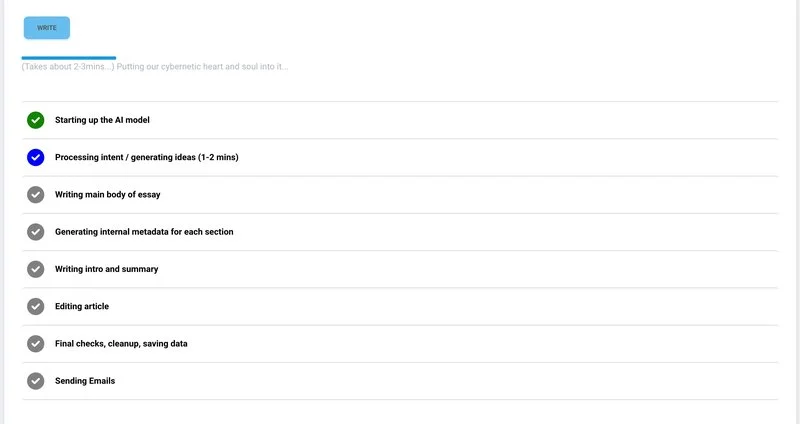
I've tested this on about 30 articles and it seems to be working well. But please let me know if you run into issues. As you know, AI's output is probabilistic, so it's very possible for there to be some underlying issues. But if you ping me on the bottom right on the support window, I'll be happy to fix any issues that arises! LOTS more to come. Stay tuned. TLDR: this is not a "sexy" update in that it doesn't add any new features, but it's a big one in that it makes the AI more capable and more accurate. But this update also allows for future updates to be easier, if that makes sense.
Earlier updates
Changes from January to March 2023 are listed in Compiled Updates Til March 25, 2023, and everything before that is in Compiled Updates Til Jan 4, 2023.